There’s a pattern that shows up again and again in independent wellness businesses. A therapist spends years building genuine expertise. Clients love them. Referrals come in. The waiting list grows. And then, at some point, they decide to grow intentionally — to stop depending entirely on word of mouth and start attracting clients through their website.

So they pay someone to build a clean, professional site. They write service pages. They add photos and prices. They wait.
Nothing happens.
Six months later, they Google their own business name followed by “London” and find themselves buried beneath directories, aggregator sites, and competitors they’ve never heard of. The website exists. The clients don’t come.
This is not a content problem. It’s usually not even a design problem. More often than not, it’s a technical visibility problem — and the most common piece of that puzzle is one that almost nobody in the wellness industry knows about: Google cannot properly see your website.
How Search Engines Actually Find Your Content
Most people think of Google as something that discovers websites automatically. And in a sense, it does — Google crawls the internet constantly, following links, reading pages, building its index. But “eventually” is doing a lot of work in that sentence.
For a new website, or a site that hasn’t been properly configured, Google may take weeks to discover some pages, months to discover others, and never discover some at all — particularly service sub-pages, blog posts, or location-specific landing pages that aren’t prominently linked from your homepage.
The way you actively help Google find and index your pages is through a file called a sitemap. A sitemap is essentially a complete map of your website — every URL, organised and submitted directly to Google Search Console. It’s like handing Google a directory of your entire site rather than waiting for it to wander through your pages on its own.
Without one, Google might index your homepage but miss your individual service pages entirely. It might see your “Lymphatic Drainage Massage” page but not know it exists in context with your “Post-Operative Recovery” page and your “Body Sculpting” page. The connections that tell Google you’re a specialist rather than a generalist — those come through proper site structure, and a sitemap is the foundation.
Creating a sitemap used to require technical knowledge or hiring a developer. Now you can generate one in minutes using a sitemap generator tool — it crawls your website, builds the XML sitemap file automatically, and gives you exactly what you need to submit to Google Search Console. For most small wellness businesses, this is a one-hour job that makes an immediate difference to how your site is read by search engines.
The Other Visibility Mistakes Wellness Sites Make
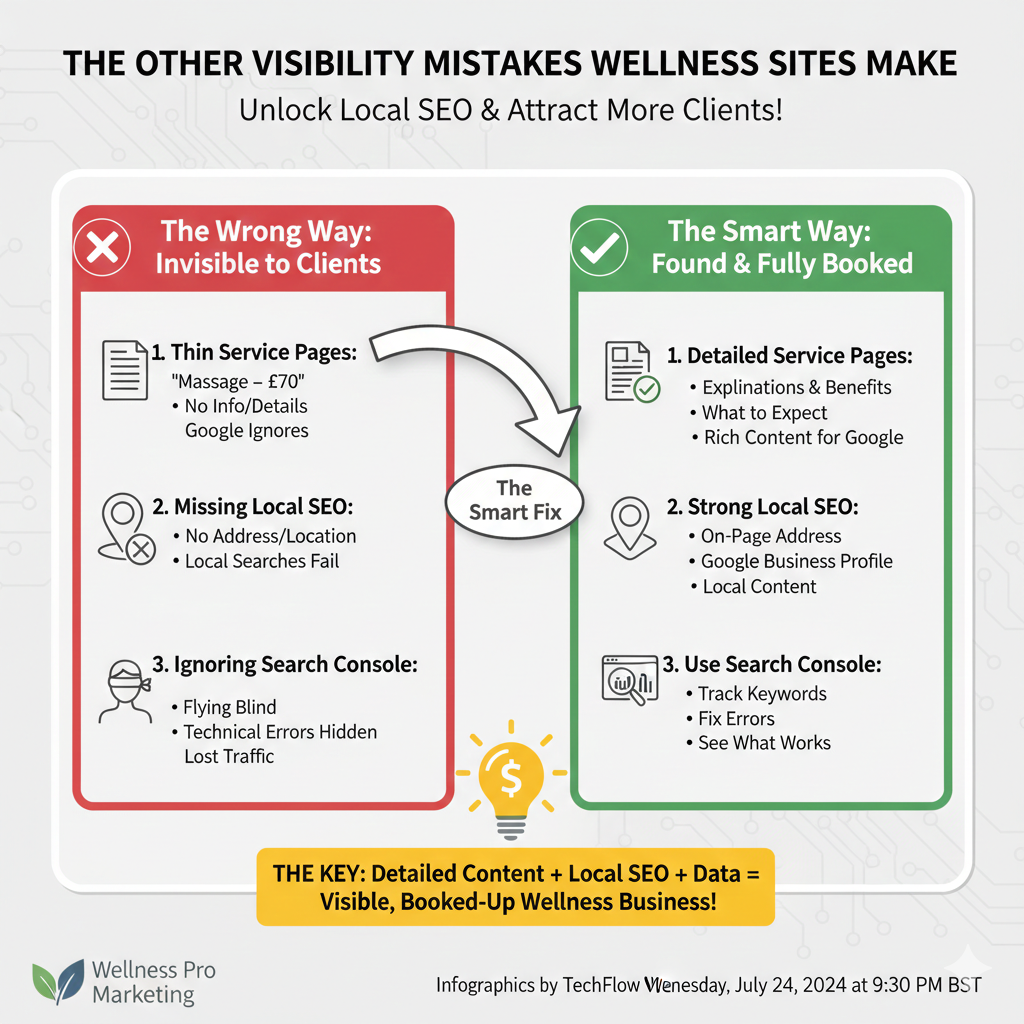
While you’re looking at your technical setup, there are a few other patterns that quietly kill search visibility for massage and beauty businesses specifically.
Thin service pages: A page that says “Lymphatic Drainage Massage — £70 — 60 minutes” tells Google nothing. A page that explains what lymphatic drainage is, who it benefits, what happens during a session, and what clients should expect afterwards — that page has content Google can read, understand, and serve to someone searching “lymphatic drainage massage London.” The depth difference matters enormously.
No local SEO signals: Most wellness clients search with location intent — “massage therapist near me,” “post-op recovery massage South London.” Your website needs to clearly signal where you are and who you serve, not just generically that you offer massage services. Your Google Business Profile, your on-page address information, and local content all factor in.
Ignoring Google Search Console: This is Google’s free tool for website owners, and most small businesses never set it up. It shows you exactly which searches are bringing people to your site, which pages are being indexed, and where technical problems exist. If you’re not using it, you’re flying blind.
The Hidden Booking Problem: Ghost Leads and Fake Enquiries
Here’s a problem that grows with visibility: as your website gets more traffic, not all of it is real.
Wellness and beauty businesses that use online contact forms or email-based booking systems increasingly see a particular type of low-quality lead — enquiries submitted with disposable or temporary email addresses. These come in looking like real client enquiries, but when you follow up, the email bounces or simply disappears into the void.
This isn’t necessarily malicious. Some of it is automated spam. Some of it is people who found your website through a directory and casually submitted a form with a throwaway email, never intending to actually book. Either way, it wastes your time and skews your data — if you’re tracking how many people are enquiring through your website, fake enquiries make your conversion rate look worse than it actually is.
The practical fix is to add basic email validation to your contact and booking forms. Most modern booking platforms (Fresha, Cliniko, Jane App) have spam filtering built in, but if you’re using a simple WordPress contact form or a custom booking setup, adding a free email verification step — or simply blocking known disposable email domains — removes the majority of ghost enquiries. It’s a five-minute configuration change that keeps your inbox clean and your data honest.
This matters more than it sounds when you’re making decisions about where your marketing budget should go. If you’re seeing thirty enquiries a month but ten of those are fake, your real conversion metrics look very different from what your dashboard shows.
Turning Visibility Into Actual Bookings
Getting found on Google is the first half of the problem. The second half is what happens when someone actually lands on your page.
Wellness clients — particularly those looking for post-operative care or specialist body treatments — are making a decision that involves a significant degree of trust. They’re not buying a product. They’re choosing someone to work on their recovering body, or to help them feel at home in their skin again. The website has to earn that trust before the booking happens.
A few things that convert wellness website visitors into bookings at a meaningfully higher rate:
Real photography: Stock images of anonymous massage tables communicate nothing. Photos of your actual space, your hands, your equipment — even imperfect ones — communicate reality and build trust in a way stock photos never will.
Genuine reviews, prominently placed: A visitor who arrives from Google doesn’t know you at all. Social proof from real clients — ideally with their names and specific treatment mentions — does much of the selling that your service descriptions can’t.
Clear, frictionless booking: Every step between “I want to book” and “I have a confirmed appointment” is a place a potential client can change their mind. WhatsApp-only booking works if you’re already at capacity, but for a growing practice, a single booking button that leads directly to available slots removes friction that costs you real bookings.
Answering the questions clients are afraid to ask: Post-operative clients in particular have questions they often feel embarrassed to ask a stranger before meeting them — what stage of recovery is appropriate, whether their specific procedure is something you’ve worked with, and what to expect from the first session. A detailed FAQ section isn’t just SEO content. It’s the reassurance that speaks directly to the anxiety a new client feels before reaching out.
The 72-Hour Visibility Sprint
If you want to make a concrete improvement to your website’s search visibility this week without hiring anyone, here’s the order to do it in:
Day one: Create a free Google Search Console account and add your website. This alone starts feeding Google data about your site. Then generate your sitemap and submit it through Search Console — the whole process takes under an hour and immediately puts you ahead of the majority of independent wellness websites in your area.
Day two: Review your top three service pages and make each one genuinely useful. Add real information, anticipate questions, explain the process. You’re not trying to write essays — you’re trying to write content that a potential client would actually want to read before making a booking decision.
Day three: Check and update your Google Business Profile. Make sure your address, hours, services, and photos are current. Respond to any reviews you haven’t responded to yet. This takes thirty minutes and has direct impact on how prominently you appear in local search results.
None of this requires a marketing agency. It requires about four hours of your time and the understanding that your website is not a brochure — it’s the first conversation you have with every client who finds you through Google. Make it a good one.